
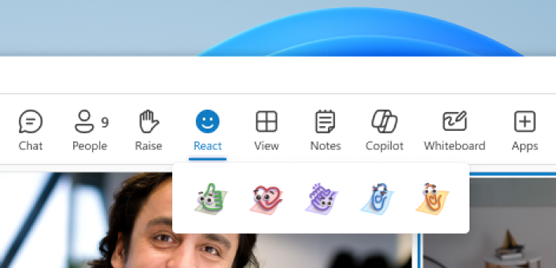
Microsoft Teams continues pushing personalization in meetings—but this time, it’s going a step further.
Now you can bring your organization’s branding directly into meeting reactions.
With Branded Meeting Reactions, companies can replace the default emojis with their own visual identity.
What’s new?
Microsoft is introducing the ability for IT admins to upload custom reaction icons that reflect:
- Company branding
- Event themes
- Campaign visuals
- Internal initiatives
Once configured, these reactions become available for participants during meetings.
What does this actually mean?
Instead of the usual 👍 ❤️ 👏 😄 😮
You could have:
- Your company logo
- A mascot
- Campaign-specific icons
- Event branding
👉 All mapped to the same reactions users already know.
How it works
This is not a user-level feature—it’s controlled by IT.
- Admins upload branded reaction assets
- They assign them through customization policies
- Organizers select a meeting theme (if applicable)
- Participants use those branded reactions during the meeting

Important:
- These reactions are part of meeting themes / customization policies
- They are managed at the tenant level
- Users don’t upload reactions themselves in this scenario
Where this becomes interesting
This is not just a visual tweak.
It opens new use cases:
1. Events and webinars
- Branded reactions aligned to event identity
- Better engagement during live sessions
2. Internal campaigns
- Use reactions for initiatives (wellness, security, training, etc.)
- Reinforce messaging in a subtle way
3. Company culture
- Replace generic emojis with something that feels “yours”
- Create a more consistent digital workspace
👉 This is especially relevant for large organizations running Town Halls or All Hands meetings
What admins need to know
Before you get excited, a few key points:
- This capability is tied to Teams Premium and customization policies
- Admins are responsible for:
- Uploading assets
- Managing themes
- Assigning them to users or groups

Also important:
- Reactions can reflect brand assets like logos, mascots, or campaign visuals
- These assets become visible to all meeting participants once applied
Rollout
- Status: Rolling out
- Start: May 2026
What you should do
This is one of those features that looks simple… but benefits from planning.
1. Talk to your branding or marketing team
Don’t let IT decide icons alone.
This is a great opportunity to align:
- Visual identity
- Campaign messaging
- Event experiences
2. Define use cases before enabling
Ask:
- Will we use this only for events?
- For all meetings?
- For specific departments?
3. Keep it simple
Too many variations can confuse users.
Start with:
- One theme
- Clear mapping (like → logo, applause → celebration icon)
Final thoughts
Branded reactions might look like a small feature… but they reflect a bigger shift:
👉 Meetings are becoming part of your digital brand experience.
If used correctly, this can:
- Improve engagement
- Reinforce identity
- Make meetings feel more intentional
If not… it’s just another emoji set.
Deja un comentario