Problem:

We have an Audiocodes Mediant 1000B Gateway integrated with Lync Server 2013, and it has a card with 4 FXO ports

When we receive an incoming call from the PSTN, we can answer without problem. The issue comes when the call is finished. If the call is terminated from Lync side, the call FXO port is released. But, if the PSTN side is who end the call, the call does not release and we can see the FXO port busy.

Solution:

We are in Mexico, so we change Call Progress Tone File with other one made for Mexico (Default file is for USA ). Once we did it, we tried again and the problem was solved. No matter who end the call, the FXO port was released.
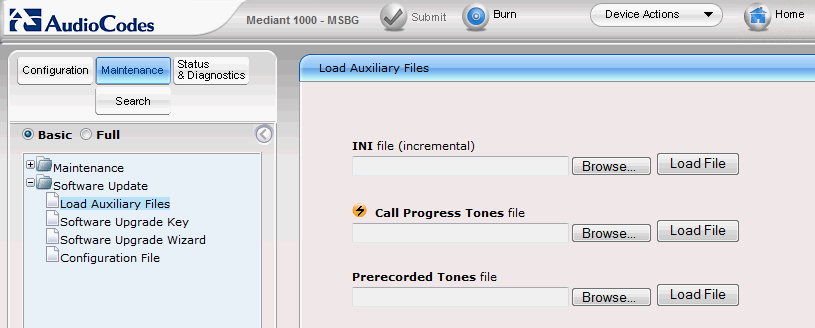
 

Imagen 023


Here’s the link to Download Mexico Call Progress Tone File

Download

I hope this help you

9 respuestas a “Audiocodes FXO – Does not release call”

  1. Avatar de Nick
    Nick

    Hola Rodolfo, pregunta: y donde cargas ese archivo así como donde lo seleccionas para configurarlo?. Yo tengo un Gateway M800 y un M1K y en ambos tengo el mismo problema. Pls me podrías ayudar con mas detalle? Gracias

    Me gusta

    1. Avatar de Rodolfo (Rilk) Castro
      Rodolfo (Rilk) Castro

      Que tal Nick,

      Se carga dentro de Maintenance -> Load Auxiliary Files -> Call Progress Tone

      Actualizo el post, para poner la pantalla en donde se realiza.

      Saludos.

      Me gusta

      1. Avatar de Nick
        Nick

        OK, y con eso es suficiente? o todavía hay que seleccionarlo en alguna parte de la configuración. Gracias.

        Me gusta

      2. Avatar de Rodolfo (Rilk) Castro
        Rodolfo (Rilk) Castro

        El cambio requiere de un reinicio del Gateway para poder aplicar. No hay modificar nada mas dentro de la configuración del Gateway.

        Me gusta

      3. Avatar de Nick
        Nick

        Excelente Rodolfo. Ya lo hice y hasta ahorita parece que funcionó…lo seguiré probando. Muchas gracias por el dato. Saludos.

        Me gusta

  2. Avatar de Oz Longa
    Oz Longa

    Hola Rodolfo como estás. Solo quería preguntarte si puedes ser tan amable de compartir el ini de tu mp118 para ver si puedo terminar de configurar mi audio codes. Gracias de antemano.

    Me gusta

    1. Avatar de Rodolfo (Rilk) Castro
      Rodolfo (Rilk) Castro

      Ese .INI ya no lo tengo, fue una maqueta que ya cambie. Puedes decirme que problema tienes para ver si puedo apoyarte.
      Saludos.

      Me gusta

  3. Avatar de Juan Carlos Arce
    Juan Carlos Arce

    Excelente. Una pregunta como hiciste para hacer el archivo .dat. Estuve intentando hacerlo con el CPT Wizard pero nunca me conecta al MP-114. Como la haces?

    Gracias por compartir conocimiento

    Me gusta

    1. Avatar de Rodolfo Castro

      Hola Juan Carlos. Ese .dat tuve que pedirlo al soporte de audiocodes ya que igual que tu ,tuve problemas al intentar crearlo.
      Saludos

      Me gusta

Replica a Nick Cancelar la respuesta