
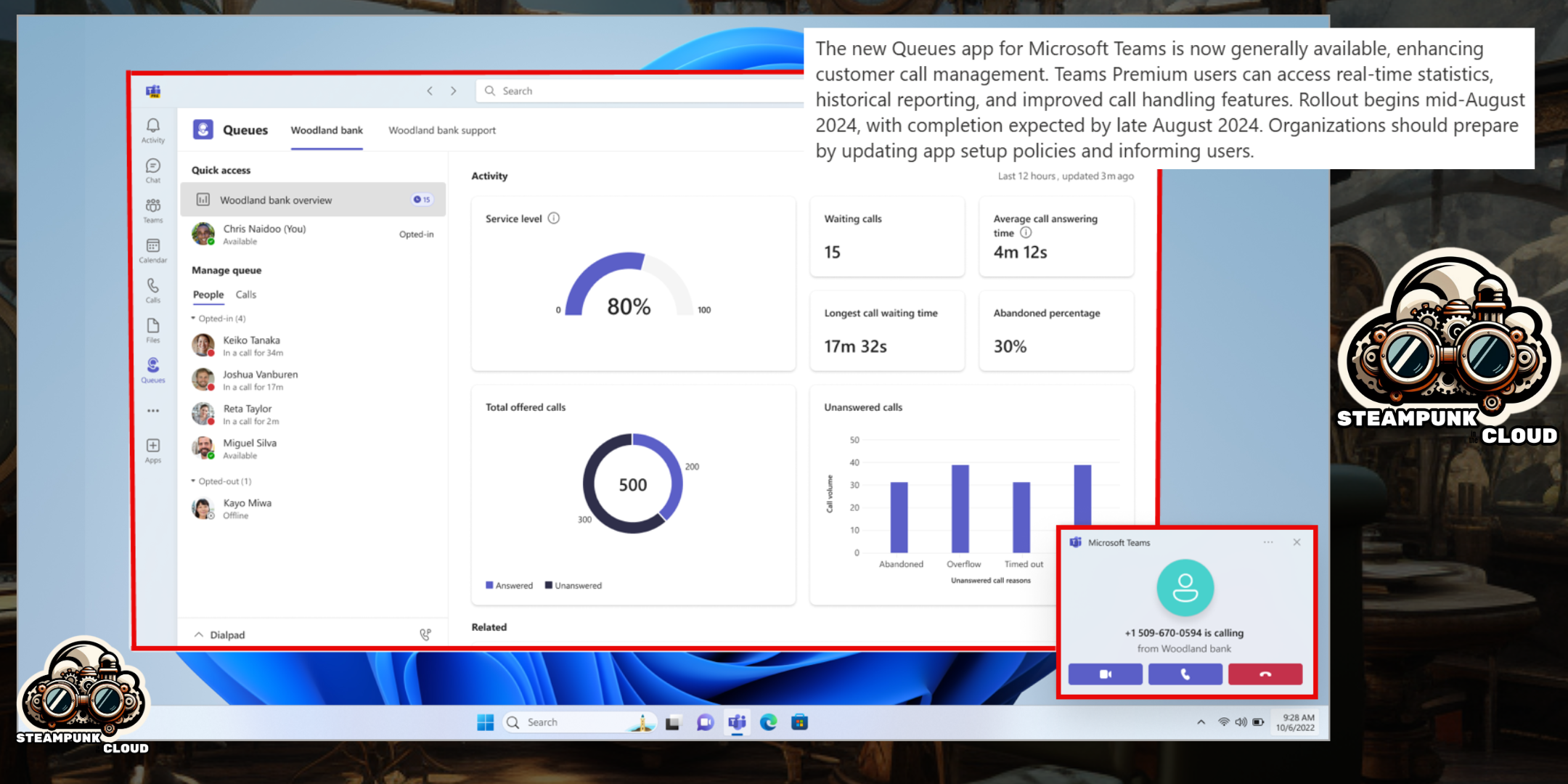
Hello everyone! Today, I have some exciting news to share with you. Microsoft is thrilled to announce the general availability of the Queues app, a new native Teams application designed to improve customer call management. 🎊
What is the Queues app?
The Queues app is integrated with Teams Phone and allows team members to manage call queues more efficiently without leaving Teams. This means you can handle all your calls directly from the platform you already know and love. Say goodbye to constantly switching apps! 🙌
When will it be available?
General availability (Worldwide and GCC) will begin in mid-August 2024 and is expected to be completed by late August 2024. So, get ready for a smoother and more efficient call experience! 📅
How will this affect your organization?
Before the rollout:
Teams users can receive and answer calls from call queues directly from their Teams client, just like any other incoming call.
After the rollout:
In addition to receiving and answering call queue calls, Teams Premium licensed users will be able to select “View more apps” on the left side of Teams and then select the Queues app.
Key features of the Queues app:
- 📊 Real-time statistics: Provides an overview of call queue, auto attendant, and agent performance.
- 📈 Historical reporting: Tracks past performance of auto attendants, call queues, and agents.
- 🔄 Agent opt-in and opt-out: Allows team members to join or leave call queues based on availability. Authorized users can opt in or out on behalf of agents.
- 🤝 Collaborative call handling: Facilitates teamwork with call transfers and communication through the People list.
- 📞 Outbound calls: Enables calls on behalf of call queues or auto attendants.
- 🛠️ Enhanced management: Authorized users can configure teams, call queues, and auto attendants.
What do you need to do to prepare?
We recommend that you:
- Review your existing app setup policies and consider pre-pinning this app for your call queue agents. Learn more: Manage app setup policies in Microsoft Teams
- Configure authorized users for call queues and auto attendants if you haven’t already. Plan for auto attendant and call queue authorized users.
- Notify your users about this change and update any relevant documentation.
Conclusion
The Queues app is a powerful tool that promises to transform how you manage customer calls, improving efficiency and collaboration within your team. Don’t miss this opportunity to optimize your workflow and keep your customers satisfied! 🚀
Follow our blog for more updates and tips on how to make the most of Microsoft Teams and other productivity tools! 🌟


 STEAMPUNK IN THE CLOUD
Deja un comentario